Metrics Insights
Ask your 3E data. Get trusted answers faster.
Ask natural-language questions across approved reports, metrics, and measures — with governed definitions, visible context, and review controls.
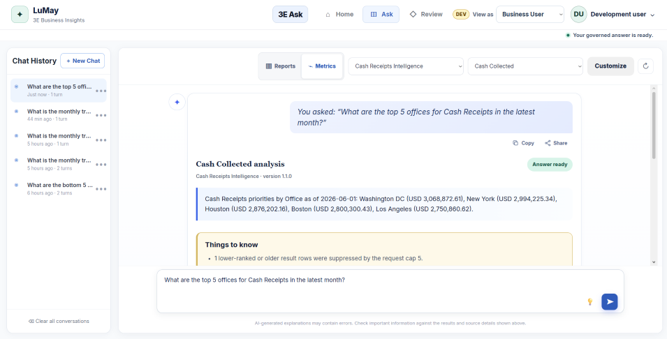
Turn approved 3E data
into clear business answers.
Metrics Insights helps finance, billing, collections, and operations teams ask questions in plain language without navigating complex reports every time.
Trusted data. Easier access. Faster decisions.
Governed. Accurate. Actionable.
“What are the top 5 offices for Cash Receipts?”
PERIOD: Q3 2025Cash Receipts Intelligence
Measure: Cash Collected · catalog-rule-3e-cr01
GOVERNED SOURCE · APPROVED 3E CATALOG| Office | Cash Receipts | Share |
|---|---|---|
| Washington DC | $4,820,340 | 24.6% |
| New York | $3,950,120 | 20.1% |
| Houston | $3,102,880 | 15.8% |
| Boston | $2,640,410 | 13.5% |
Figures reflect the approved 3E Cash Receipts measure for the selected period. Percentages are share of firmwide total across all offices.
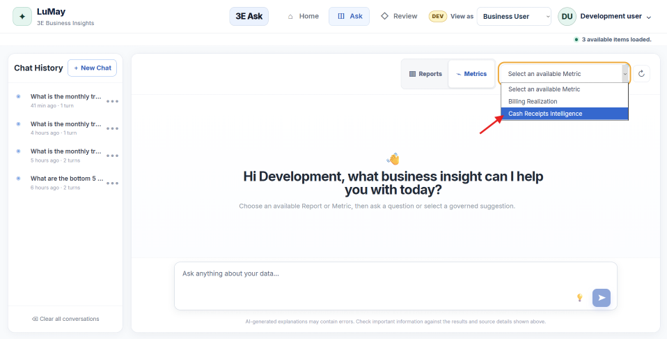
The metric comes before the question.
Users choose an approved Report or Metric before asking — keeping every answer anchored to definitions your firm already trusts.
Firm-sanctioned financial reports from Elite 3E.
Standardized calculations like Cash Receipts Intelligence.
Specific parameters like Cash Collected or Aging Cadence.
Conversational question evaluated strictly inside this boundary.
Don't just get an answer. See the context behind it.
Every response transparently displays its question bounds, underlying metric catalog, analytical version, and essential operational caveats.
Spend less time finding the number.
Metrics Insights cuts repeated report navigation and analyst dependency — a shorter, consistent path from question to usable insight.
Less searching. More understanding.
Choose approved context
Select from governed Elite 3E reports or metric catalogs.
Ask the business question
Type naturally or pick a suggested business query.
Understand the answer
Receive immediate structured results with full context & caveats.
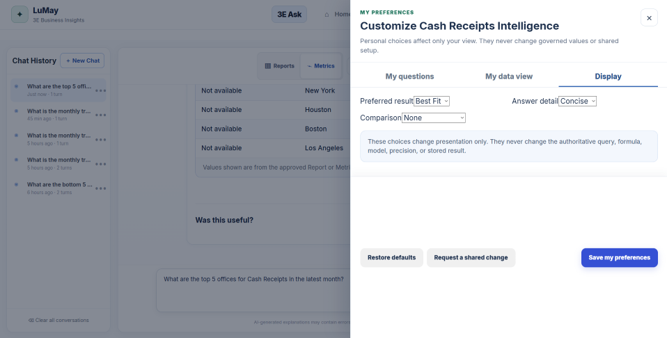
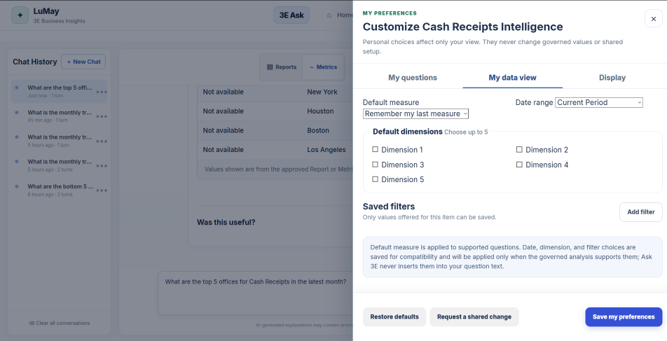
Personalize the experience, not the metric.
These preferences change the user experience, but they do not change authoritative formulas, models, queries, or stored results.
User Can Change
- Display
- Questions
- Filters
- Date ranges
- Answer detail
User Cannot Change
- Authoritative query
- Accounting formula
- Model
- Stored result
Personalized view. Governed values.
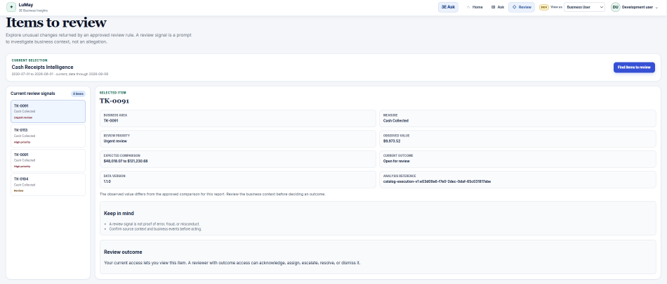
Surface unusual movements without jumping to conclusions.
Metrics Insights turns unusual values into neutral review signals for investigation.
Reviewers can see: Priority, Observed value, Expected comparison, Governed measure, Data version, Analysis reference, Current outcome.
Authorized reviewers can acknowledge, assign, escalate, resolve, or dismiss items.
Related Articles
Recent Posts
- What Are the Best Ways to Automate Repetitive Paralegal Tasks in 2026?
- What AI Is Best for Legal Document Review in 2026?
- What Are the Best Ways to Reduce Paralegal Workload in 2026?
- Top 10 Agentic AI for Law Firms in 2026: The Definitive Guide to Autonomous Legal Intelligence
- What Are the Best Autonomous Legal AI Systems in 2026?
- Best AI Software for Paralegals in 2026: Complete Guide & Top 10 Tools Compared
- 10 Best AI Tools for Paralegals in 2026 (Top Platforms Compared)
- AI Virtual Paralegal vs Human Paralegal: 10 Key Differences in 2026
- 15 Best Use Cases for AI Virtual Paralegals in 2026
- 10 Powerful Ways Lawyers Can Use an AI Virtual Paralegal to Scale in 2026
Make Trusted 3E Insight Easier to Use
Ask faster. Understand sooner. Stay governed.
Give finance, billing, collections, and business teams easier access to approved 3E insight without weakening control over the definitions behind the numbers.