


Legal Hold Checklist: How to Preserve Evidence for Litigation
A legal hold email is not the same as an effective preservation process. If a company sends a notice but lets an automated retention rule delete relevant chats, the notice alone cannot restore the records.
This checklist helps legal operations teams and counsel organize preservation of electronically stored information (ESI) in anticipated or active U.S. civil litigation. It is a process guide, not case-specific legal advice. Preservation duties and scope depend on the facts, jurisdiction and counsel's judgment.
When should a legal hold begin?
Assess preservation duties when litigation is reasonably anticipated, not only when a complaint is filed. In U.S. federal litigation, Federal Rule of Civil Procedure 37(e) addresses circumstances involving loss of ESI that should have been preserved and could not be restored or replaced. The rule's remedies depend on additional findings; it does not say every lost file produces the same sanction.
Step 1: Define the preservation scope
Counsel should document the matter, triggering facts, likely issues, relevant date ranges and data categories. Identify likely custodians and noncustodial sources such as shared drives, collaboration tools, ticketing systems and backups where relevant.
Avoid a blanket 'preserve everything forever' instruction when a defensible, proportionate scope can be articulated.
Step 2: Map systems and custodians
Interview legal, IT, records management and business owners. Record where relevant content is stored, retention periods, auto-deletion settings, encryption constraints, third-party providers and mobile or ephemeral messaging risks.
| Source | Preservation question | Evidence to record |
|---|---|---|
| Email and calendar | Are mailbox and deletion policies affected? | Hold configuration and scope |
| Chat and collaboration | Are messages or channel histories ephemeral? | Relevant channels and retention settings |
| Cloud documents | Are versions and permissions relevant? | Folder, owner and version references |
| Endpoint devices | Is local-only content involved? | Device assignment and collection decision |
| Business applications | Are audit events and exports available? | System owner and export method |
Step 3: Issue a clear hold notice
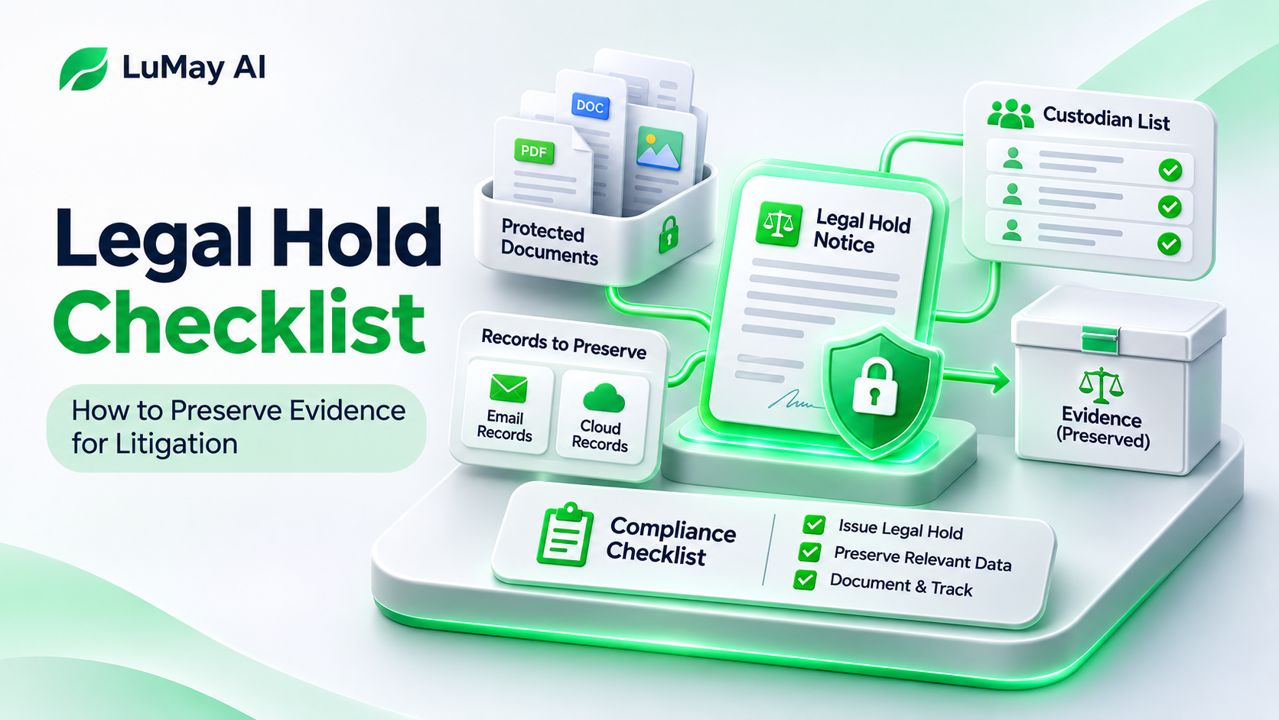
The notice should identify the subject matter in accessible language, state what information must be preserved, explain ordinary deletion to suspend and provide a contact for questions. Track notice recipients, delivery and acknowledgments.
Reissue the notice when new custodians or material data sources are identified. Do not assume a single email proves ongoing compliance.
Step 4: Implement technical preservation
Where appropriate, coordinate with IT to suspend relevant deletion or retention workflows, configure legal holds in supported systems, preserve key metadata and maintain chain-of-custody records for collections.
Confirm that each technical control actually applies to the intended accounts and content. System exports may omit versions, reactions, attachments or other metadata unless configured correctly.
Step 5: Monitor, revisit and document decisions
Keep a matter-level register containing custodians, data sources, notice status, technical action, verification result, exceptions and responsible owner. Review personnel departures, migrations, retention changes and newly discovered sources.
If potentially relevant information is missing, promptly escalate to counsel to assess restoration options, prejudice and appropriate next steps. Do not conceal gaps in collection or preservation.
Step 6: Release the hold deliberately
Do not restore deletion policies merely because one hearing ends. Counsel should confirm whether the duty continues due to appeals, related matters or other obligations. Record approval, effective date, affected systems and notice to custodians before releasing the hold.
A legal hold tracker template
| Field | Suggested entry |
|---|---|
| Matter ID | Internal matter reference |
| Trigger date | Date and facts counsel identified |
| Custodian | Name/role or coded identifier |
| Data source | Mailbox, device, repository or application |
| Hold sent / acknowledged | Timestamp and evidence |
| Technical preservation | Configuration/change record |
| Exceptions | Gap, mitigation and reviewer |
| Review and release | Counsel authorization and date |
This is an illustrative template, not a certification of compliance.
Where AI can help—and where it should not decide
AI-assisted tools may help propose custodians from reviewed matter facts, classify documents, summarize preservation questions or flag missing acknowledgments. Their suggestions require verification, and sensitive matter data must be processed under authorized access, confidentiality and retention controls.
Do not delegate the legal determination of whether a duty exists, which sources are proportionately in scope or when a hold can be released to an unreviewed model output.
Common mistakes
Common avoidable problems include equating notice delivery with compliance, forgetting chat systems, failing to verify retention suspensions, not tracking departed custodians and releasing a hold without documented approval.
Next step
Use the tracker as a shared record between counsel, legal operations, IT and records management. If using AI in adjacent legal workflows, see LuMay's privilege review guide for a separate review task.
Frequently asked questions
Is a legal hold the same as collecting evidence?
No. Preservation prevents loss; collection gathers data for review or production. The scope and timing may differ.
Can an AI tool automatically decide when to release a hold?
No. Legal judgment and accountable approval remain necessary.
Should the notice list every technical source?
It should be understandable to custodians, while the technical preservation plan can include additional system-specific detail maintained by counsel and IT.