



8 Enterprise AI Architecture Patterns That Scale
Most enterprise AI programs don't stall because the model is weak. They stall because the first use case was wired straight to a model API, and the next five inherited the same shortcuts.
Enterprise AI architecture is what separates a promising assistant from a system that serves thousands of users, passes an audit, and survives a model change.
This guide covers eight patterns that hold up in production. For each one you get the trade-offs and failure points, and a selection matrix at the end helps you decide what to build first.
Key Takeaways
Treat models as replaceable parts. Put lasting value in the layers around them.
Build an AI gateway and observability before your second use case, not after your tenth.
Enforce data permissions at retrieval time, never inside a prompt.
Keep deterministic steps in code, and give models only the judgment steps.
Add autonomy in stages, with human approval tied to business risk.
Use multi-agent designs only when a single agent clearly hits its limits.
What Is Enterprise AI Architecture?
Enterprise AI architecture is the system design that governs how models, data, tools, people, and business systems work together across an organization.
It reaches well beyond LLM architecture. It covers model access, retrieval over company data, AI orchestration of multi-step work, approvals, monitoring, and security.
Good AI system design assumes today's model will be replaced. It makes the surrounding enterprise AI infrastructure the durable asset.
Why Architecture Matters at Scale
One use case can survive hard-coded prompts and a single API key. Ten use cases cannot.
At scale, four pressures arrive together. Cost grows with every token. Risk grows with every tool an agent can call. Models change underneath you. Auditors ask who approved what.
Patterns give you repeatable answers to those pressures. Each new use case then plugs into a scalable AI architecture instead of rebuilding one.
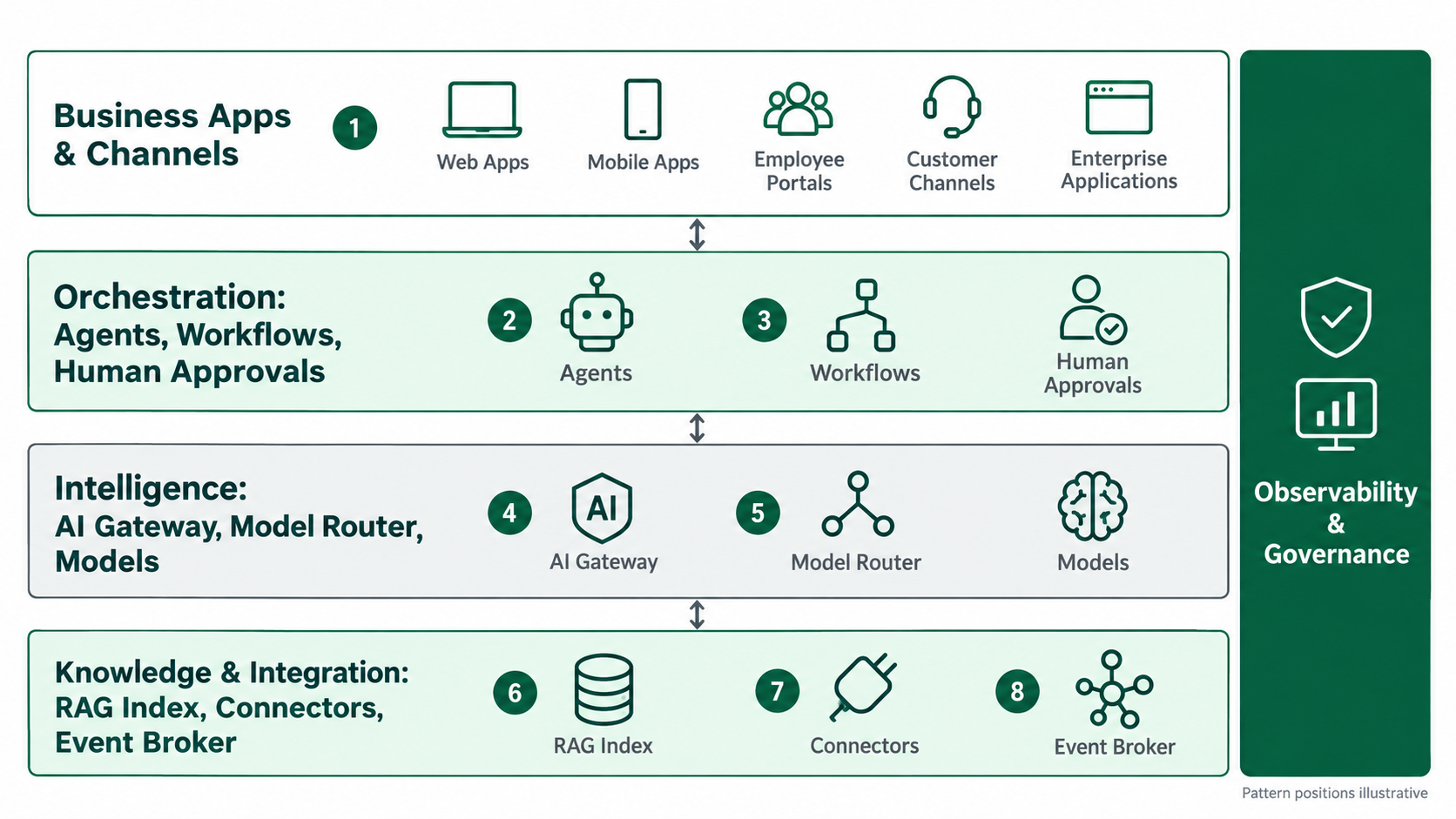
1. AI Gateway Architecture
What it is: A single controlled entry point between your applications and every model provider.
When to use it: Once more than one team, app, or model is involved, or when you need central cost and policy control.
How it works: Apps call the gateway, never the model directly. The gateway authenticates, applies quotas and filters, routes, retries, caches, and logs each request.
How it supports scale: Microsoft's Azure Architecture Center describes a gateway in front of several model deployments as a programmable routing layer. Without one, each client must handle its own retries, circuit breakers, and failover.
Key components: API management, identity integration, token quotas, semantic cache, PII filtering, usage logs.
Advantages: You get one place to swap models, enforce policy, and attribute cost to each team.
Trade-offs and failure risks: It adds an extra network hop and a new single point of failure. Deploy it redundantly across zones.
Enterprise use case: A bank gives each business unit its own token budget and redaction policy through one gateway. Platform engineers can then switch providers without touching application code.
Implementation considerations: Introduce it before use case two. Support streaming responses, and log prompts in line with your retention policy.
2. Retrieval-Augmented Generation Architecture
What it is: A pattern that grounds model answers in enterprise content retrieved at query time. The original RAG paper combined a pretrained generator with a dense retrieval index. It found the outputs more specific and factual than those of a generation-only baseline.
When to use it: When answers depend on internal, frequently changing, or permissioned knowledge.
How it works: Documents are chunked, embedded, and indexed. At query time, a retriever finds candidate passages, a reranker orders them, and the model answers with citations.
How it supports scale: Knowledge updates through re-indexing, not retraining. Content can change daily without touching the model.
Key components: Ingestion pipeline, embedding model, vector or hybrid index, reranker, permission filter, citation layer.
Advantages: Answers stay current and traceable, and hallucination risk drops when retrieval quality is high.
Trade-offs and failure risks: Poor chunking and stale indexes produce confident wrong answers. A missing permission filter can expose documents to users who should never see them.
Enterprise use case: A manufacturer's field service assistant answers from current manuals and service bulletins, filtered by product line and technician region.
Implementation considerations: Enforce document-level access inside the retrieval query. Build a retrieval test set before tuning prompts. LuMay's RAG development work focuses on grounded retrieval over your own data.
3. Agentic Workflow Architecture
What it is: A model that completes multi-step tasks using tools, inside a defined workflow. Anthropic's guide to building effective agents separates workflows, which run through predefined code paths, from agents, which direct their own steps and tool use.
When to use it: When a task spans several systems and steps, but the goal is clear.
How it works: An orchestrator gives the model a goal, tool definitions, and state. The model calls tools, reads the results, and continues until the task is done or a stop condition fires.
How it supports scale: Deterministic steps stay in code, and the model handles only the judgment calls. That keeps cost and variance bounded. Anthropic also advises starting with the simplest design that works, because agentic systems trade latency and cost for task performance.
Key components: Tool registry, state store, execution runtime, step limits, retry logic.
Advantages: It automates real work, not just answers.
Trade-offs and failure risks: Errors compound across steps, and tools with write access raise the stakes of every mistake.
Enterprise use case: An insurer's agent captures first notice of loss details, checks the policy, opens the claim, and schedules an adjuster.
Implementation considerations: Give each tool least-privilege scopes, cap the number of steps, and make every write idempotent. For custom builds, see LuMay's AI agent development.
4. Multi-Agent Orchestration
What it is: Several specialized agents coordinated by a supervisor or a shared protocol.
When to use it: When a task has distinct specialties, or needs parallel work that no single context can hold.
How it works: A supervisor breaks down the task, assigns subtasks to specialists, collects their outputs, and assembles the result. Agents share state through a controlled store.
How it supports scale: Specialists can run in parallel on smaller models. New capabilities arrive as new agents rather than as rewrites.
Key components: Supervisor, agent registry, typed message contracts, shared memory, budget limits.
Advantages: It is modular and supports clear separation of duties.
Trade-offs and failure risks: Debugging gets harder, token use multiplies, and agents can loop on each other. The pattern is often overkill for linear tasks.
Enterprise use case: A legal operations pipeline runs intake, billing-rules, and document agents in parallel. A supervisor then assembles one review package.
Implementation considerations: Define inputs and outputs for each agent, set global token and time budgets, and trace every handoff.
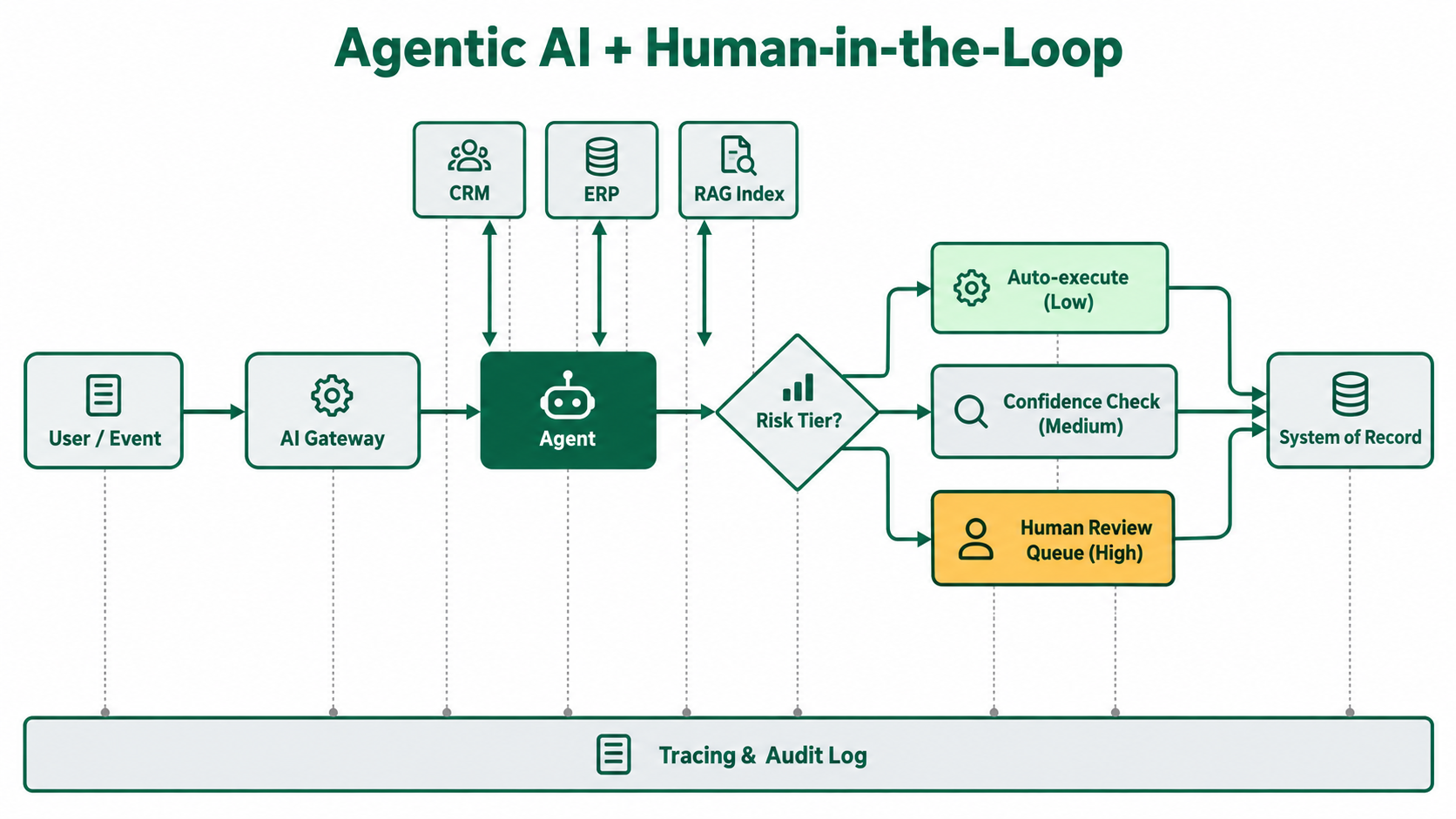
5. Human-in-the-Loop Architecture
What it is: Designed checkpoints where people approve, edit, or reject AI actions.
When to use it: When actions are costly, irreversible, regulated, or customer-facing.
How it works: Every action is assigned a risk tier. Low-risk actions run automatically. Medium-risk actions run only when confidence is high. High-risk actions pause in a review queue with their evidence attached.
How it supports scale: People review exceptions, not everything, so review workload grows more slowly than volume.
Key components: Risk policy, confidence scoring, review queue, SLA timers, escalation path, feedback capture.
Advantages: Autonomy can grow safely, and every review produces labeled data.
Trade-offs and failure risks: Queues can back up, reviewers can start rubber-stamping, and thresholds set too strictly stall throughput.
Enterprise use case: A finance team lets AI draft vendor payment holds. Anything above an approval limit waits for a controller.
Implementation considerations: Track the override rate for each action type, and relax thresholds only when the evidence supports it. The LuMay security architecture builds approvals, auditability, and human-in-the-loop controls into the platform foundation.
6. Multi-Model and Model-Routing Architecture
What it is: Sending each request to the most suitable model based on task, cost, latency, or data rules.
When to use it: When workloads mix simple and complex requests, or when data residency limits which models you can use.
How it works: A router classifies each request using rules, a classifier, or a learned model, then selects a model tier. Fallbacks trigger on errors or low quality scores.
How it supports scale: The RouteLLM research trained routers to pick between a stronger and a weaker model. On public benchmarks, it reported more than a twofold cost reduction without losing response quality. Your domain results will differ, so test before relying on this.
Key components: Routing policy, model catalog, evaluation harness, fallback chain, per-model cost tracking.
Advantages: Lower cost, resilience across providers, and less lock-in.
Trade-offs and failure risks: Tone and format can drift between models, and every model change needs regression testing.
Enterprise use case: A contact center sends FAQs to a small fast model, complaint summaries to a mid-tier model, and regulatory letters to its strongest model.
Implementation considerations: Run routing inside the gateway, and version prompts separately for each model.
7. Event-Driven AI Architecture
What it is: AI steps triggered by business events over queues or streams, instead of synchronous user calls.
When to use it: When work arrives in volume or bursts, such as documents, transactions, tickets, or alerts.
How it works: Systems publish events. AI workers consume and process them, then publish results for downstream systems.
How it supports scale: Queues absorb spikes, workers scale horizontally, and backpressure keeps you within provider rate limits.
Key components: Event broker, consumer workers, schema registry, dead-letter queue, idempotency keys, replay.
Advantages: Resilience and loose coupling, and a natural fit for batch and near-real-time work.
Trade-offs and failure risks: Consistency is eventual, and end-to-end tracing is harder. Outputs that fail validation can also turn into poison messages that get retried over and over.
Enterprise use case: A logistics firm classifies supplier documents as they arrive, extracts the key fields, and posts exceptions to a review queue.
Implementation considerations: Validate AI outputs against schemas before publishing. Send failures to a dead-letter queue along with the original payload.
8. AI Observability and Governance Architecture
What it is: The cross-cutting layer that traces, evaluates, audits, and controls every AI interaction.
When to use it: Always, in production. This pattern makes the other seven auditable.
How it works: Every model call, retrieval, tool call, and approval emits a trace, and evaluations run on sampled outputs. The OpenTelemetry GenAI semantic conventions, still marked as in development, define spans, metrics, and events for model and agent operations.
For AI governance, the NIST AI Risk Management Framework is a voluntary framework. It organizes risk work into four functions: govern, map, measure, and manage.
How it supports scale: Shared telemetry and policy mean new use cases inherit controls on day one.
Key components: Distributed tracing, evaluation pipelines, prompt and model registry, policy engine, audit log, cost dashboards.
Advantages: Faster debugging, defensible audits, and early warning on drift and spend.
Trade-offs and failure risks: Logged prompts can hold sensitive data, and heavy evaluation adds cost.
Enterprise use case: A healthcare provider traces every scheduling-agent call and samples conversations for quality review. It also keeps an audit trail of each booking change.
Implementation considerations: Carry one trace ID across the gateway, retrieval, and agents from the start. Redact sensitive data before it is logged.
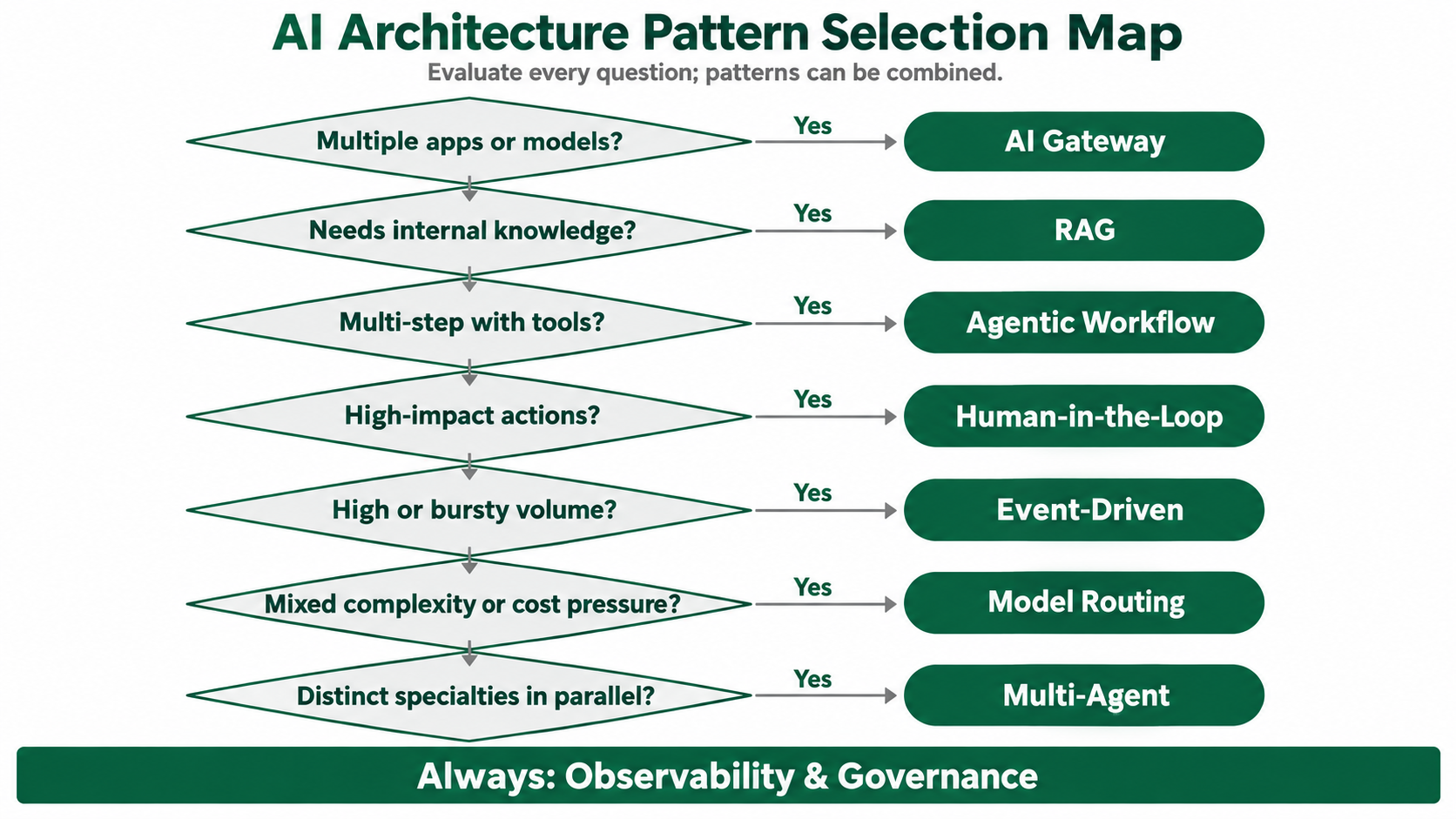
Enterprise AI Architecture Selection Matrix
Use this matrix to match patterns to your situation. Complexity reflects typical build and operating effort, not a vendor benchmark.
Pattern | Start here when | Main scale lever | Watch for | Complexity |
|---|---|---|---|---|
AI Gateway | 2+ apps or models | Central policy and routing | Single point of failure | Low |
RAG | Answers need internal data | Re-index, don't retrain | Permission leaks, stale index | Medium |
Agentic Workflow | Clear goal, many steps | Code for rules, model for judgment | Compounding errors | Medium |
Multi-Agent | Distinct specialties, parallel work | Independent specialists | Loops, token growth | High |
Human-in-the-Loop | High-impact actions | Review only exceptions | Queue backlog | Low to Medium |
Model Routing | Mixed request complexity | Right-sized models | Output inconsistency | Medium |
Event-Driven | High or bursty volume | Queues and horizontal workers | Tracing gaps | Medium |
Observability and Governance | Anything in production | Inherited controls | Sensitive logs | Medium |
A practical build order:
Gateway plus observability as the foundation.
RAG for knowledge use cases.
Agentic workflows with human-in-the-loop controls.
Routing and event-driven patterns once volume grows.
Multi-agent designs last.
LuMay's Enterprise AI Framework is a useful companion for mapping these layers to your environment.
Common Enterprise AI Architecture Mistakes
Starting with multi-agent systems. Most tasks need one well-scoped agent or a plain workflow.
Scattering API keys across apps. Without a gateway, cost attribution and model changes become painful projects.
Filtering permissions in the prompt. If a restricted document reaches the model, it can reach the user.
Adding observability after an incident. You cannot debug an agent decision you never traced.
Running batch work synchronously. High-volume jobs belong on queues, not on user-facing request paths.
Skipping evaluation sets. Without a fixed test set, every prompt or model change is a guess.
Enterprise AI Architecture Implementation Checklist
All model traffic flows through a redundant AI gateway.
Each team has token quotas and cost attribution.
Retrieval enforces document-level access control.
Agent tools use least-privilege scopes and step limits.
Every action has a risk tier and approval rule.
Routing and fallbacks are tested against an evaluation set.
Async workloads use queues with dead-letter handling.
One trace ID follows each request end to end.
Sensitive data is redacted before logging.
Governance roles map to govern, map, measure, and manage.
Frequently Asked Questions
Q1: What is enterprise AI architecture?
A: It is the system design connecting models, data, tools, people, and business systems, with security and governance built in. It lets AI scale across many use cases without being rebuilt for each one.
Q2: Which architecture pattern should an enterprise implement first?
A: Start with an AI gateway and observability. They are low in complexity, and every later pattern depends on them for control, cost tracking, and debugging.
Q3: Is RAG better than fine-tuning for enterprise knowledge?
A: For changing or permissioned knowledge, RAG is usually the better starting point, because content updates without retraining. Fine-tuning suits stable style or format needs.
Q4: When should we use multi-agent orchestration instead of a single agent?
A: Use it when the work has clearly distinct specialties or real parallelism. If one agent with good tools can finish the task, adding agents mostly adds cost and debugging effort.
Q5: How do we govern AI agents in production?
A: Combine risk-tiered human approvals, least-privilege tool access, full tracing, and audit logs. Align ownership and processes to a recognized framework such as the NIST AI RMF.
Build Enterprise AI Architecture That Holds Up in Production
Patterns are only useful when they run on a platform that enforces them consistently.
The LuMay platform combines an agent runtime, an orchestration engine for agents and approvals, connectors, and security and governance controls. It supports SaaS, private cloud, hybrid, and on-prem deployment.
Want to see how these patterns map to one of your workflows? Book a LuMay demo and walk through the architecture with the team.


